Text Appointment Reminders
PBClinic Uses An API call to ClickATell
ClickATell is a secure global network to reliably send SMS message
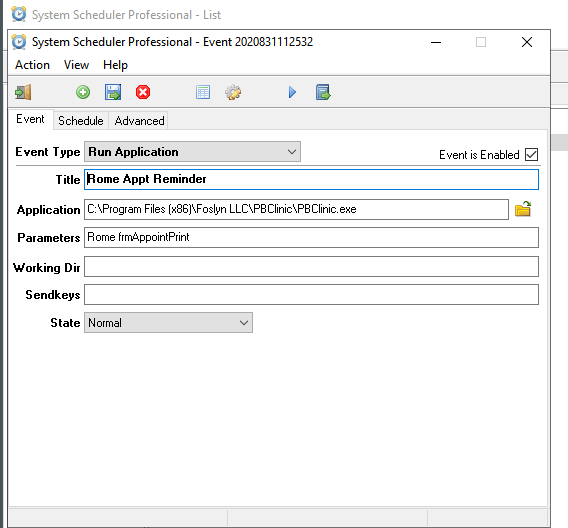
To Use This Feature Invoke with
"C:\Program Files (x86)\Foslyn LLC\PBClinic\PBClinic.exe" Demo frmAppointPrint
Where Demo is the database to be used
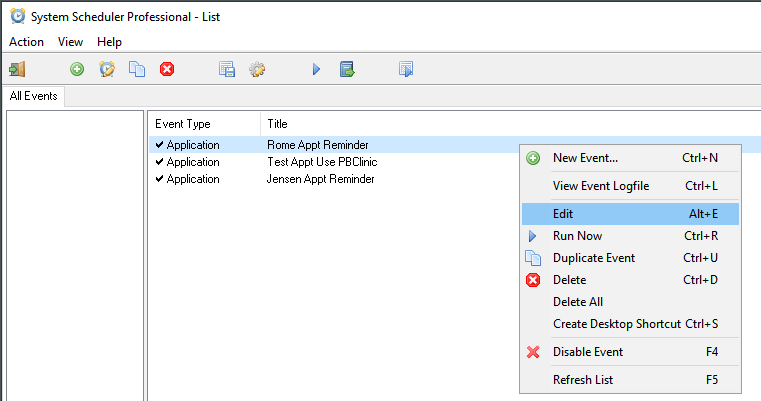
Screen Shots of Setting Up The Running of Texting Appointments Using App: System Scheduler Professional
Here is the subroutine from frmAppointPrint.vb which is used to send patient appointments to ClickATell for texting.
Private Sub ClickATellSend(rowPerson As PatientDataSet.PatientRow, datStartDate As DateTime, rowOwner As OwnerApptDataSet.OwnerApptRow)
Dim rowCellApptText As CellApptTextingDataSet.CellApptTextingRow = Me.CellApptTextingDataSet.CellApptTexting.Rows(0)
Dim str_apiKeyParm As String
Dim strClickATellHttpSend As String
Dim strClickATellRequest As String
Dim strClickATellResult As String
Dim strCustomMessage As String
Dim strMesssage As String
Dim strContentParm As String
Dim strToPhoneParm As String
Dim strFromPhoneParm As String
Dim strStartDate As String
Dim strStartTime As String
Dim strPatientName As String = rowPerson.pers_FirstName ' + " " + rowPerson.pers_LastName
'If rowPerson.pers_MiddleName.Trim.Length > 0 Then strPatientName = strPatientName + " " + rowPerson.pers_MiddleName.Substring(1, 1)
' strPatientName = strPatientName + " " + rowPerson.pers_NameSuffix
Dim strOwnerName As String = " "
If rowOwner IsNot Nothing Then strOwnerName = rowOwner.owne_Name
strClickATellHttpSend = "https://platform.clickatell.com/messages/http/send?"
str_apiKeyParm = "apiKey=" + rowCellApptText.cell_ClickATell_apiKey
strCustomMessage = rowCellApptText.cell_TextMsgAdditional
strStartDate = datStartDate.ToString("MM/dd/yyyy")
strStartTime = datStartDate.ToString("hh:mm tt")
strToPhoneParm = "&to=" + "1" + rowPerson.pers_MobilePhone
' strFromPhoneParm is not used only necessary when using two way messaging
strFromPhoneParm = "&from=" + rowCellApptText.cell_ClickATell_FromPhoneNumber
strMesssage = strPatientName + " You Have An Appointment on " + strStartDate + " At " + strStartTime + " With " + strOwnerName + ". " + strCustomMessage
strContentParm = "&content=" + strMesssage
'MessageBox.Show(strMesssage.Length.ToString, "message length")
' request = String.Format("https://platform.clickatell.com/messages/http/send?apiKey=aBIcM6uXRMCsvkH0b10D7w==&to=12532081967&content=ApptNextMonday")
'strClickATellRequest = "https://platform.clickatell.com/messages/http/send?apiKey=aBIcM6uXRMCsvkH0b10D7w==&to=12532081967&content=Test+message+text&from=1253-218-1619"
strClickATellRequest = strClickATellHttpSend + str_apiKeyParm + strToPhoneParm + strContentParm + strFromPhoneParm
'MessageBox.Show(strClickATellRequest)
Dim webClient As New System.Net.WebClient
strClickATellResult = webClient.DownloadString(strClickATellRequest)
'MessageBox.Show(strClickATellResult)
End Sub